

Be Careful: How to Protect Your CS2 Account from Scammers
Recently, there have been multiple reports of missing skins from accounts, appearing as follows: users send skins for sale or trade, but they never reach the recipient. This can happen if scammers gain access to your API key and intercept trades. Learn how this works and how to protect your account.
- What is an API Key
- How Scams Work
- How to Avoid Falling Victim
What is an API Key
An API key is a unique combination of letters and numbers that allows control over an account. It is used to identify the account. This means that if a malicious actor obtains your key, they can hijack your trades. As a result, items you send to someone else end up with the scammer, or conversely, you don’t receive skins sent to you.
By default, accounts do not have an API key. It is not required for sending trades or other regular actions within the account—it's primarily used by developers creating applications that interact with Steam. To check whether you have such a key, visit https://steamcommunity.com/dev/apikey. If no key has been created, you'll see a page like this:
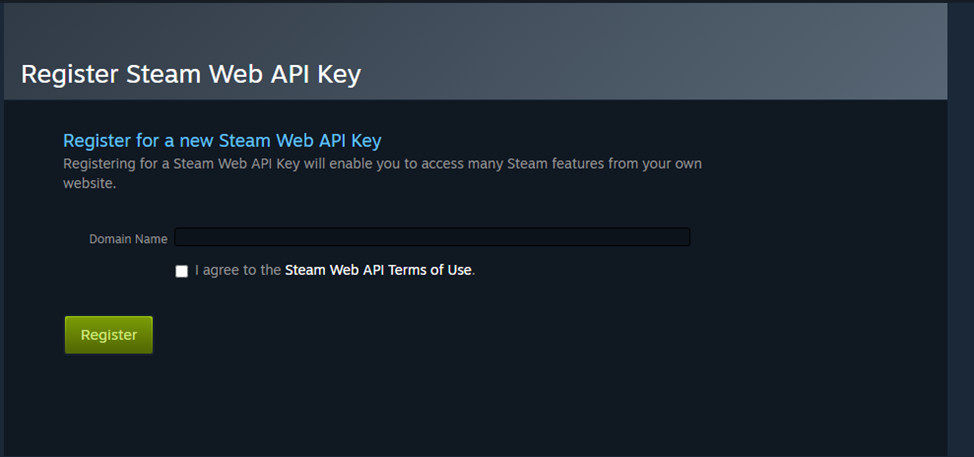
If after the link you see this message, there's nothing to worry about. No API key is linked to your account, meaning attackers cannot use it to gain access. If a key does exist, we recommend revoking it (click 'Revoke API Key'), logging out from all devices (this can be done via the Steam Guard app), and changing your account password.
How Scams Work
Currently, user accounts are protected by Steam Guard, making it difficult for scammers to directly access account controls. Instead, they use multi-step schemes that trick the account owner into giving them access. Here’s how it happens:
- The user visits an untrusted website requiring login via Steam account.
- The site steals account data and injects an API key onto the account.
- Using the key, the scammer intercepts trades. Now, whenever you send skins to someone, they go to the scammer instead.
The user visits an untrusted website, where logging in through a Steam account is required.
The site steals account data and implants an API key onto the account.
Using the key, trade interception occurs. Now, whoever you send skins to, they end up with the scammer.
Because many users are already aware of this scheme and act cautiously, scammers have devised more complex tactics. The core objective remains unchanged—tricking the user into logging into a phishing site and then initiating a trade. But attackers now use social engineering techniques, gaining trust and convincing players to perform specific actions, for example:
- A player you don’t know personally offers you to join a tournament on a third-party website. They claim their team is almost complete and just needs one more member. Often, they’ve communicated with the victim for several days or even weeks beforehand, building trust.
- Logging into the so-called tournament site leads to the same outcome—the creation of an API key accessible to the attacker.
- Then, the scammer convinces the player to send skins to another user under some pretext. For instance, they might say expensive items aren’t allowed in tournaments, so some must be transferred to a friend. The player sends the skins to someone they trust, but the recipient doesn't receive them because the scammer intercepted the trade using the stolen API key.
A player you don’t know personally offers you to join a tournament on a third-party website. They claim their team is almost complete and just needs one more member. Often, they’ve communicated with the victim for several days or even weeks beforehand, building trust.
Logging into the so-called tournament site leads to the same outcome—the creation of an API key accessible to the attacker.
Then, the scammer convinces the player to send skins to another user under some pretext. For instance, they might say expensive items aren’t allowed in tournaments, so some must be transferred to a friend. The player sends the skins to someone they trust, but the recipient doesn't receive them because the scammer intercepted the trade using the stolen API key.
In such cases, if you check your trade history, you’ll notice two identical trade offers—one intended for the real recipient, and another sent to a scam bot. Scammers use information from your account to clone the recipient’s username and avatar, making the bot nearly indistinguishable from the real person.
As you can see, the method is the same, but because it's hidden behind multiple steps, it becomes harder to detect. Scammers are now willing to spend more time building trust to gain access to your account. Their main goal is to obtain the API key; once they have it, they use various persuasion tactics.
For example, besides the scenario described above, they might message you pretending to be Steam Support, accusing you of possessing stolen items. To make it convincing, they may remove your friends from your account and add a note in your profile stating suspicious activity was detected. Then, they claim that to verify your account, you need to send items to a friend—after which everything proceeds according to the same scheme.
How to Avoid Falling Victim
Thus, scammers pursue two goals—to create an API key on your account and then trick you into confirming a trade. To disguise these actions, they may invent fairly elaborate stories. Therefore, to avoid losing valuable skins, follow these rules:
- Check reviews of websites on external resources before logging in via Steam. Avoid participating in questionable tournaments.
- Be cautious when communicating with users you don’t know personally. Be careful with links they send you. Research them before clicking or performing any actions on those sites.
- Periodically check whether an API key has appeared on your account to detect suspicious activity early.
- Be wary if someone messages you claiming to be Steam Support. If such messages come through regular chat, they are scams. Real support staff will never add you as a friend or message you directly.
- When clicking links, verify you haven’t landed on a phishing site. Often, the URL in the address bar differs from the legitimate one by just one or two characters.
- When sending items to someone, carefully double-check who you’re trading with.
- Use only trusted third-party sites for selling or trading skins.
Check reviews of websites on external resources before logging in via Steam. Avoid participating in questionable tournaments.
Be cautious when communicating with users you don’t know personally. Be careful with links they send you. Research them before clicking or performing any actions on those sites.
Periodically check whether an API key has appeared on your account to detect suspicious activity early.
Be wary if someone messages you claiming to be Steam Support. If such messages come through regular chat, they are scams. Real support staff will never add you as a friend or message you directly.
When clicking links, verify you haven’t landed on a phishing site. Often, the URL in the address bar differs from the legitimate one by just one or two characters.
When sending items to someone, carefully double-check who you’re trading with.
Use only trusted third-party sites for selling or trading skins.
Follow these rules, and your account will stay safe.